PyStormTracker









Storm Track Explorer
Interactive visualization of cyclone trajectories.
PyStormTracker is a Python package for cyclone trajectory analysis. It provides cyclone detection, trajectory construction, and track-based analysis for meteorological and climate datasets. The package includes a Numba implementation of the Simple Tracker described by Yau and Chang (2020) and TRACK algorithms described by Hodges (1994, 1995, 1999). The project was initially developed at the National Center for Atmospheric Research (NCAR) during the 2015 SIParCS program.
Features
Vectorized, array-backed data model: Stores track coordinates, times, identifiers, and variables in contiguous NumPy arrays.
Trackobjects are views over this storage rather than independent collections of center objects.Numba JIT-compiled kernels: Detection, Laplacian intensity, great-circle geometry, connected-component labeling (CCL), subgrid refinement, and Modified Greedy Exchange (MGE) kernels use cached, GIL-free Numba functions.
Multiple Algorithms:
Simple: Fast, local-extrema detection and deterministic nearest-neighbor linking.
Hodges (TRACK): Thresholded object detection with connected-component labeling (CCL), spherical cost functions, adaptive constraints, and iterative Modified Greedy Exchange (MGE) linking based on TRACK. See the Hodges implementation documentation and spectral filtering accuracy.
HEALPix: Thresholded object detection on a one-dimensional HEALPix neighbor graph, followed by the Hodges MGE linker.
Coordinate-aware Xarray input:
DataLoaderopens NetCDF, GRIB, and Zarr data, resolves common variable and coordinate aliases, and identifies regular latitude-longitude, full Gaussian, reduced-Gaussian, projected, and HEALPix grids.Execution Backends:
Simple: Serial, threaded Dask detection, and MPI detection. Parallel paths gather detections before one linking pass.
Hodges and HEALPix: Serial only; unsupported backend selections raise an error.
Typed Implementation: Built for Python 3.11+ with strict type safety and
mypycompliance.Formats and analysis: Reads IMILAST and JSON track data; writes IMILAST, TRACK tdump, and JSON. Analysis functions include secondary-variable sampling, track matching, gridded cyclone and track metrics, Eulerian variance and wind indices, CORMAX, and CCA/PCA truncation cross-validation.
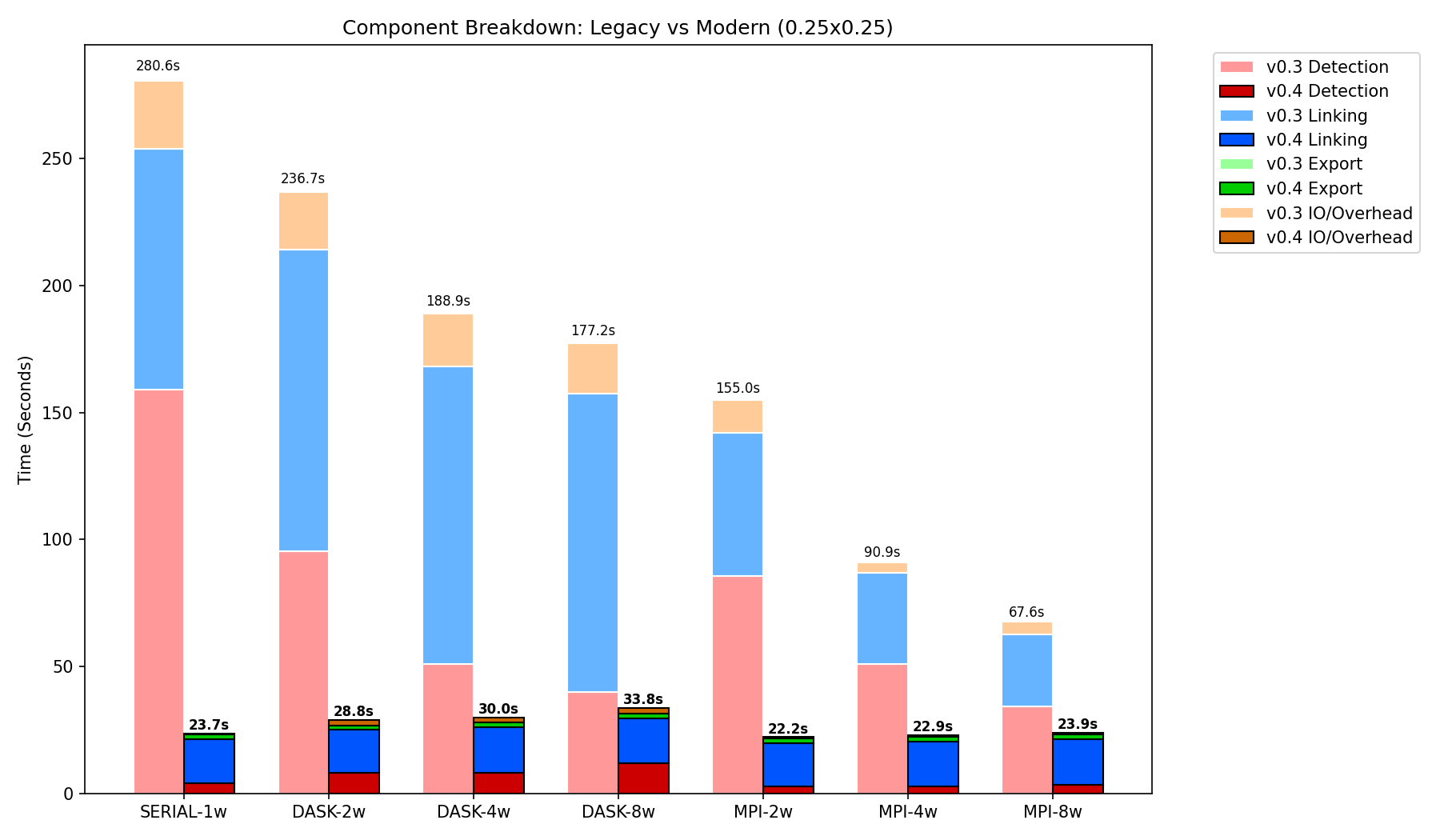
Measured v0.3.3 and v0.4.0 timings for the 0.25° ERA5 benchmark described in the benchmark documentation.
Technical Methodology
The trackers apply the following stages:
Preprocessing: Optional spherical harmonic transform (SHT) filtering on global grids, discrete cosine transform (DCT) filtering on regional grids, Sardeshmukh-Hoskins spectral tapering, and regridding to polar stereographic or HEALPix coordinates. Full and reduced Gaussian grids are handled through
ducc0geometry metadata.Detection: The Simple tracker applies a sliding-window local-extrema filter and uses the discrete Laplacian magnitude to select among adjacent extrema. Hodges and HEALPix use thresholding, connected-component labeling, object filtering, and local-extrema detection.
Subgrid Refinement: Optional local quadratic surface fitting estimates a stationary point below the grid spacing. It is off by default for Simple and on by default for Hodges and HEALPix. On periodic global Hodges grids, a
RectSphereBivariateSplinevalue is also evaluated at the quadratic center.Linking: Simple uses deterministic nearest-neighbor linking with a vectorized great-circle distance matrix. Hodges and HEALPix use Modified Greedy Exchange with spherical displacement and smoothness constraints.
Documentation
Full documentation, including API references and advanced usage examples, is available at pystormtracker.readthedocs.io.
Installation
Prerequisites
Python 3.11+
Message Passing Interface (MPI):
Linux/macOS:
OpenMPIis recommended and included as a development dependency.Windows: Use
winget install -e --id Microsoft.msmpi(recommended) or MS-MPI.
Spherical Harmonic Transform (SHT) engine:
ducc0provides scalar and spin-weighted spherical harmonic transforms, reduced-grid synthesis, and HEALPix geometry.
Free-threaded Python:
Python 3.14 free-threaded support is experimental.
gribandzarrmodules are not supported by Python3.14truntime.
From PyPI
You can install the latest stable version of PyStormTracker directly from PyPI:
Using pip:
# Standard installation
pip install PyStormTracker

# With optional components
pip install "PyStormTracker[mpi]"     # Includes mpi4py for distributed execution
pip install "PyStormTracker[grib]"    # Includes GRIB support
pip install "PyStormTracker[netcdf4]" # Includes NetCDF4 backend
pip install "PyStormTracker[zarr]"    # Includes Zarr support (with remote HTTP/S3/GS)
pip install "PyStormTracker[eof]"     # Includes xeofs for CCA/PCA analysis
pip install "PyStormTracker[all]"     # Includes non-visualization optional components
Using uv:
# For use as a CLI tool
uv tool install "PyStormTracker[mpi]"

# For use as a library in your project
uv add "PyStormTracker[mpi]"
From Conda-Forge
You can also install PyStormTracker from conda-forge:
Using mamba:
mamba install -c conda-forge pystormtracker
Using conda:
conda install -c conda-forge pystormtracker
From Source
Install with uv:
git clone https://github.com/mwyau/PyStormTracker.git
cd PyStormTracker
uv sync
Usage
Command Line Interface
Once installed, the stormtracker command provides separate subcommands for tracking, sampling, comparison, and conversion:
1. Track Features
Run the core storm tracking algorithm (e.g., tracking cyclones in MSLP):
stormtracker track -i data.nc -v msl -o tracks.json -m min -a hodges -f json
2. Sample Variables
Extract external variables (e.g., precipitation) along existing tracks:
# Calculate mean precipitation within a 500km radius of storm centers
stormtracker sample -i tracks.json -d precip.nc -v pr -o tracks_enriched.json --method mean --radius 500
3. Match and Intercompare
Compare tracks from different datasets or ensemble members:
# Match tracks from two sources with a 200km mean distance threshold
stormtracker compare --ref era5.json --comp gfs.json --max-dist 200 --json
4. Convert & Visualize
Convert between formats or generate interactive HTML explorers:
# Generate a standalone interactive map
stormtracker convert -i tracks.json -o explorer.html -f json -F html
CLI Argument Reference
Use stormtracker <command> --help for detailed argument lists. Key options for the track command include:
Argument |
Short |
Description |
|---|---|---|
|
|
Path to the input NetCDF/GRIB file. |
|
|
Variable name to track (e.g., |
|
|
Path to the output track file. |
|
|
|
|
|
Output format: |
|
|
|
|
|
|
|
|
Number of parallel workers. |
|
Inclusive spectral wave-number range. Supplying it enables filtering; the default range when filtering is enabled is |
|
|
Override algorithm-specific filtering defaults. |
|
|
Override refinement defaults. Off for simple; on for Hodges and HEALPix. |
Python API
The trackers can also be called directly:
import pystormtracker as pst

tracker = pst.HodgesTracker()

tracks = tracker.track(infile="data.nc", varname="vo", mode="max")
Analyze the results programmatically
for track in tracks:
    if len(track) >= 8:
        print(f"Track {track.track_id} lived for {len(track)} steps.")
Export results
tracks.write("output.txt", format="imilast")
Sample Data
Sample datasets for testing and benchmarking are hosted in the PyStormTracker-Data repository.
Development
Setup
Using uv to set up your development environment:
# Install dependencies and sync virtual environment
uv sync --all-extras
Quality Control
Run automated checks using uv run:
Linting & Formatting:
uv run ruff check . --fix
uv run ruff format .
Type Checking:
uv run mypy .
Tiered Testing
To keep development cycles fast, testing is tiered:
Fast Tests: Default local runs (skips integration tests).
Integration Tests: Integration and regression tests.
Local: Runs “short” variants (60 time steps) to ensure backend consistency quickly.
CI: Runs “full” (all time steps) variants, including legacy regressions.
Full Suite: Everything.
Run fast unit tests only (Default):
uv run pytest
Run integration tests (Short variants locally):
uv run pytest --run-integration
Run everything:
uv run pytest --run-all
Citations
If you use this software in your research, please cite the following:
Yau, A. M. W., 2026: mwyau/PyStormTracker. Zenodo, doi:10.5281/zenodo.18764813.
Yau, A. M. W., and E. K. M. Chang, 2020: Finding Storm Track Activity Metrics That Are Highly Correlated with Weather Impacts. Part I: Frameworks for Evaluation and Accumulated Track Activity. J. Climate, 33, 10169–10186, doi:10.1175/JCLI-D-20-0393.1.
References
Reinecke, M., 2020: DUCC: Distinctly Useful Code Collection. Astrophysics Source Code Library, record ascl:2008.023, https://gitlab.mpcdf.mpg.de/mtr/ducc.
Yau, A. M. W., K. Paul, and J. Dennis, 2016: PyStormTracker: A Parallel Object-Oriented Cyclone Tracker in Python. 96th American Meteorological Society Annual Meeting, New Orleans, LA. Zenodo, doi:10.5281/zenodo.18868625.
Neu, U., et al., 2013: IMILAST: A Community Effort to Intercompare Extratropical Cyclone Detection and Tracking Algorithms. Bull. Amer. Meteor. Soc., 94, 529–547, doi:10.1175/BAMS-D-11-00154.1.
IMILAST Intercomparison Protocol: https://proclim.scnat.ch/en/activities/project_imilast/intercomparison
IMILAST Data Download: https://proclim.scnat.ch/en/activities/project_imilast/data_download
Hodges, K. I., 1999: Adaptive Constraints for Feature Tracking. Mon. Wea. Rev., 127, 1362–1373, doi:10.1175/1520-0493(1999)127<1362:ACFFT>2.0.CO;2.
Hodges, K. I., 1995: Feature Tracking on the Unit Sphere. Mon. Wea. Rev., 123, 3458–3465, doi:10.1175/1520-0493(1995)123<3458:FTOTUS>2.0.CO;2.
Hodges, K. I., 1994: A General Method for Tracking Analysis and Its Application to Meteorological Data. Mon. Wea. Rev., 122, 2573–2586, doi:10.1175/1520-0493(1994)122<2573:AGMFTA>2.0.CO;2.
License
This project is licensed under the BSD-3-Clause terms found in the LICENSE file.